Unable to Resolve DNS in Kubeadm on AWS EC2 Instance
When running a Kubeadm cluster on AWS EC2 instances, if the nodes are spread across multiple subnets, you may encounter a complete DNS resolution failure.
All nslookup or curl requests inside pods time out with connection timed out; no servers could be reached even though the CoreDNS pods are running and healthy.
The Error
Running nslookup from any pod returns a connection timeout:
kubectl exec -it dnsutils -- nslookup kubernetes.default
;; connection timed out; no servers could be reached
command terminated with exit code 1
This happens even when CoreDNS pods are fully running and the CoreDNS service exists:
kubectl get pods -n kube-system -l k8s-app=kube-dns

NAME                       READY   STATUS    RESTARTS   AGE
coredns-66bc5c9577-qxqsb   1/1     Running   0          19m
coredns-66bc5c9577-x5c65   1/1     Running   0          19m
Root Cause
Calico is the networking plugin that moves data between pods. It was set to a mode called VXLANCrossSubnet, which is supposed to wrap packets in a tunnel when pods talk across different network zones, but when nodes are on the same network, it skips the tunnel and sends packets directly.
Calico in VXLANCrossSubnet mode decides whether to use a tunnel or send traffic directly by comparing the subnet information stored on each Node resource, which comes from manual configuration or autodetection when Calico's node starts.
If that subnet information is wrong, Calico can incorrectly conclude that two nodes are on the same subnet, skip the tunnel, and send packets using raw pod IP addresses like (10.244.x.x) directly over AWS.
AWS has a built-in security feature called Source/Destination Check that inspects every packet leaving an EC2 instance.
AWS only knows about real EC2 node IPs (172.31.x.x).When it saw packets using pod IPs (10.244.x.x) as the source, it treated them as spoofed traffic and silently dropped every packet with no error or log message.
How to Fix It
Two methods are available to solve this issue. Both address the same problem but at different layers.
Method 1 resolves it at the Calico level, while Method 2 fixes it at the AWS infrastructure level. Either method works.
In our case, we used Method 2, which resolves the issue at the AWS level.
Disable AWS Source/Destination Check
Disabling Source/Destination Check tells AWS to stop inspecting packet IPs on EC2 instances. Raw pod packets pass freely without any changes to Calico.
Apply the following steps to each EC2 instance (control plane, node01, and node02).
Using AWS Console:
Open the EC2 Console and select the required instance

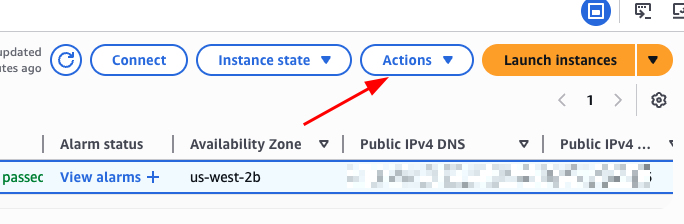
Click Actions toggle button as shown below.
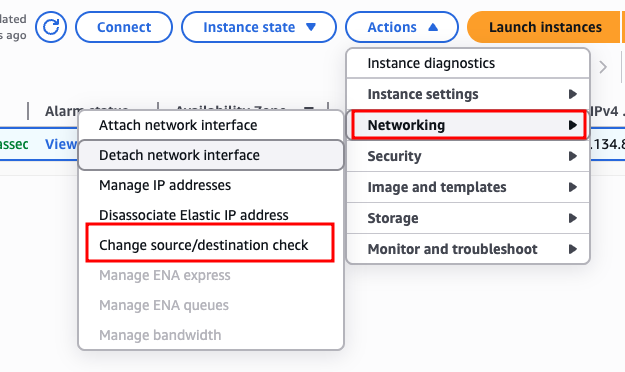
Then, go to Networking and choose Change source/destination check
There enable Stop, then click Save to apply the change
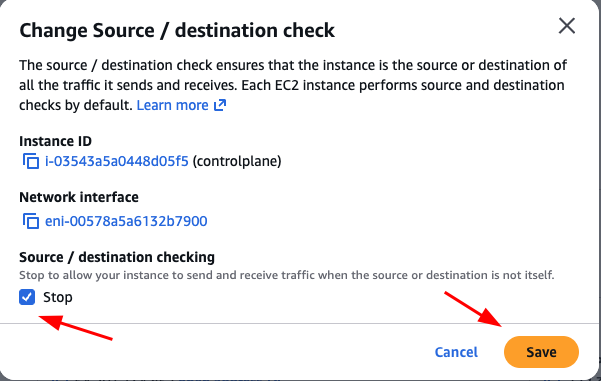
Disabling Source/Destination Check takes effect immediately. No Kubernetes or Calico restart is required.
Using AWS CLI:
First, get all instance IDs.
aws ec2 describe-instances \
  --query 'Reservations[].Instances[].[InstanceId,PrivateIpAddress]' \
  --output table
Then, run the following command to disable it on each node:
aws ec2 modify-instance-attribute \
  --instance-id <instance-id> \
  --no-source-dest-check